A bike bus only works if everyone knows when it’s coming. The real ones — like the wonderful bikebus.org.au — run on a timetable: “we leave the park at 8:10, reach the library at 8:22, the school gates at 8:35.” Riders join along the way because they know exactly when the bus rolls past their corner.
Now Party Onbici does that too. You can turn on an arrival schedule for any ride, and a time appears next to every stop on your route. It’s optional, it’s automatic, and it even waits for the slower riders.
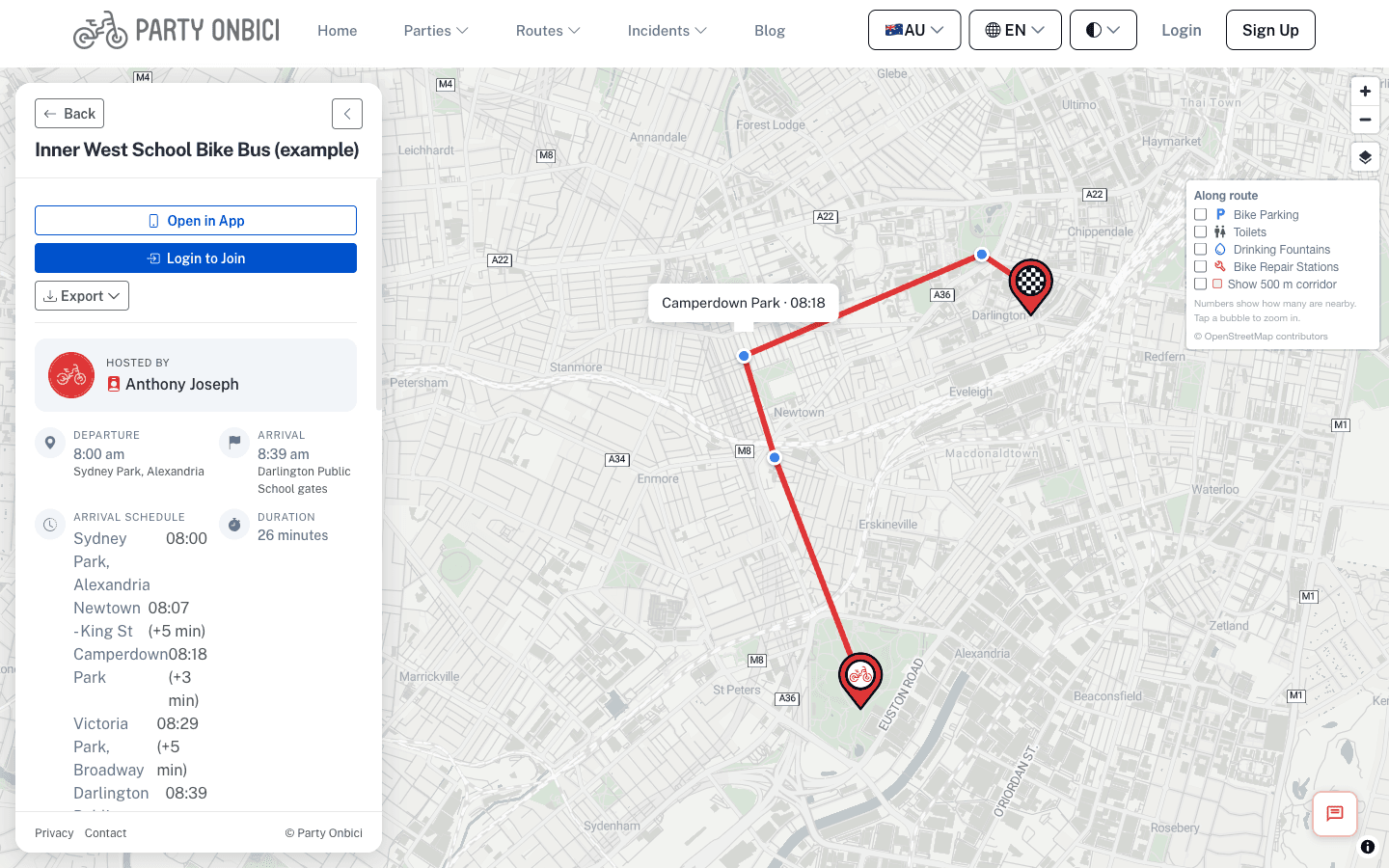
An example morning bike bus — every stop has a time, right on the map.
🕒 An arrival time at every stop — calculated for you
Flip on “Show arrival schedule” when you create or edit a ride, and Party Onbici works out the timetable for you. It starts from your departure time and walks the route leg by leg, using the real cycling travel time between each stop, so you get something like:
| |
No spreadsheets, no guessing. Change the departure time and the whole schedule shifts with it.
⏱️ Built-in wait time for stragglers
Group rides aren’t time trials. At every stop, the bus pauses for a few minutes so the tail can catch up — and the schedule accounts for that. Each stop has a wait time (5 minutes by default) that you can tune per stop, and the arrival times downstream adjust automatically to include it.
Know a particular corner always draws a crowd? Give it a longer wait. The rest of the timetable recalculates instantly.
✍️ Override any stop — and it cascades
Sometimes you just know the timing of a stop — maybe it lines up with the school bell, or a café you’ve arranged to open early. Set a manual arrival time on that stop, and Party Onbici anchors the schedule to it: every stop after it is recalculated from your override. One source of truth, no manual maths.
You can also hide the time on a stop if you’d rather not commit to it publicly.
🗺️ The schedule shows up everywhere
Once it’s on, the times travel with your ride:
- On the map — tap any stop and its arrival time is right there in the marker.
- In the ride details — a clean, bike-bus-style list of stops and times in the sidebar.
- On your share link — the public “open in app” page shows the timetable too, so someone you send the link to can see exactly when the bus reaches them.
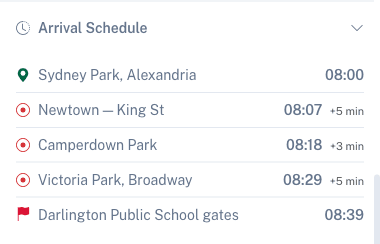
The timetable in the ride sidebar: departure, each stop’s arrival, the wait at each, and the final arrival.
📱 “Continue” instead of “you’ve arrived”
Here’s the part that makes it feel like a real bus. When you’re navigating with the app and you reach a timed stop, Party Onbici doesn’t throw confetti and end your ride. Instead it pauses and shows a “Continue” button — because this isn’t the end of the journey, it’s a meeting point.
So the faster riders arrive, the app waits with them, and nobody’s screen declares victory while half the group is still two blocks back. When you’re ready to roll on, tap Continue — or just start pedalling, and the app continues automatically the moment it sees you moving. Slower riders can take their time; everyone’s device picks the route back up on its own.
🚲 Why we built it
Bike buses turn a lonely commute into a rolling, visible, joyful community — and the thing that makes them dependable is the timetable. We wanted organisers to be able to publish one in seconds, keep it honest as plans change, and have it follow riders all the way into turn-by-turn navigation.
Whether you’re running a school bike bus, a weekend social ride, or a community commute, your group now has a schedule it can trust.
Ready to set the timetable rolling? Create your ride in Party Onbici, switch on Show arrival schedule, and share the link. Download the app and get your bike bus on time. 🚲