You’ve planned the route, you’ve packed the bag, you’re about to head out the door — and then you wonder: is the M1 still backed up? Is that grey cloud going to catch me at Pyrmont?
We’ve put both answers on the map.
What’s new
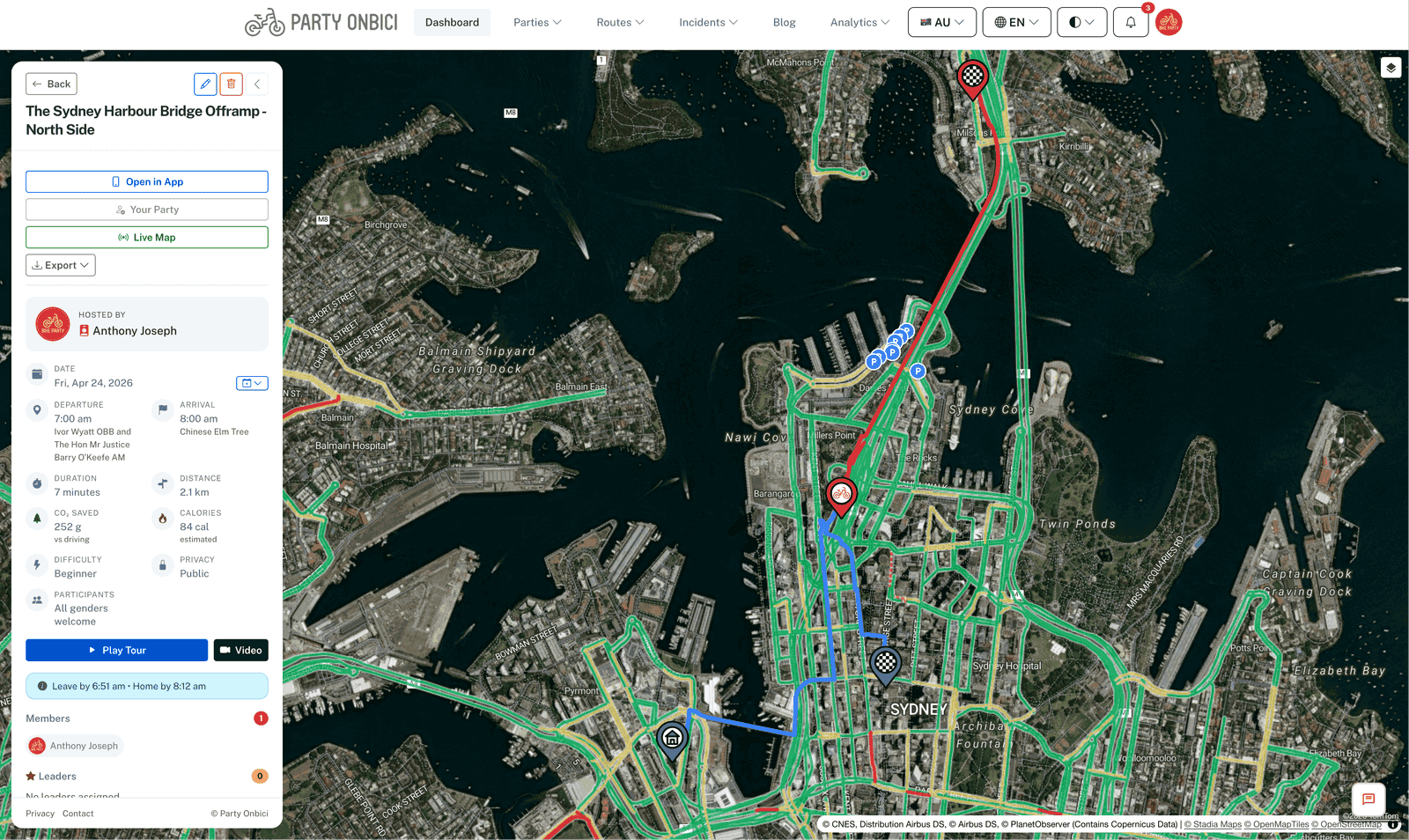
Every map across Party Onbici — party detail pages, the live ride view, the route planner — now supports two new overlays you can toggle on and off:
- Traffic — live road conditions coloured the way you’d expect: green for free-flowing, yellow for slow, orange for heavy, red for stopped.
- Rain — animated radar showing where it’s raining right now and where the cells are headed over the next hour.
Both layers update on a short loop so what you see is genuinely current, not the morning’s forecast warmed over.
Why this matters on a bike
Drivers think of traffic as an inconvenience. Cyclists think of it as a risk profile. A red arterial isn’t just slow — it’s a queue of frustrated drivers, more door-zone parking, more cars edging into bike lanes to peer around the truck in front. Knowing which roads are jammed lets you route around them, not just for time, but for headspace.
Rain is the other one we hear about constantly. Most riders don’t mind getting wet — they mind getting surprised halfway through a ride with no shell in the bag. A 30-second glance at the radar before you leave tells you whether to throw the rain jacket in.
How to use it
The toggles live in the layer switcher on the top-right of every map (the stack icon). Tap to turn each layer on or off independently — you can run traffic by itself, rain by itself, or both at once.
A few patterns we’ve found useful in testing:
- Pre-departure check. Open the party page 10 minutes before you leave. Glance at both layers. Adjust accordingly.
- Mid-ride detour. On a long ride, pull over at a café, flick on the rain layer, and decide whether to wait it out or sprint home.
- Group ride coordination. Hosts can screenshot the map with traffic enabled and drop it in the group chat the morning of the ride — useful when a route crosses an unfamiliar suburb.
What’s underneath
Traffic data comes from the same commercial feed that powers the maps you’re already looking at, with bike-relevant edge cases (shared paths, protected lanes) preserved in the underlying styling. Rain comes from regional radar networks — BOM in Australia, the equivalent national services elsewhere — stitched together so coverage works wherever the app does.
Neither layer is a substitute for looking up before you cross an intersection. But they take a little of the guesswork out of the before and during of a ride.
Open a map, hit the layer toggle, and have a look at what you’ve been riding through all along.
— The Party Onbici Team